Status Saver: Video Downloader
- 4.8
- Rating
- 50.00M
- Installs
- Free
- Price

 Analysis by App-foxy
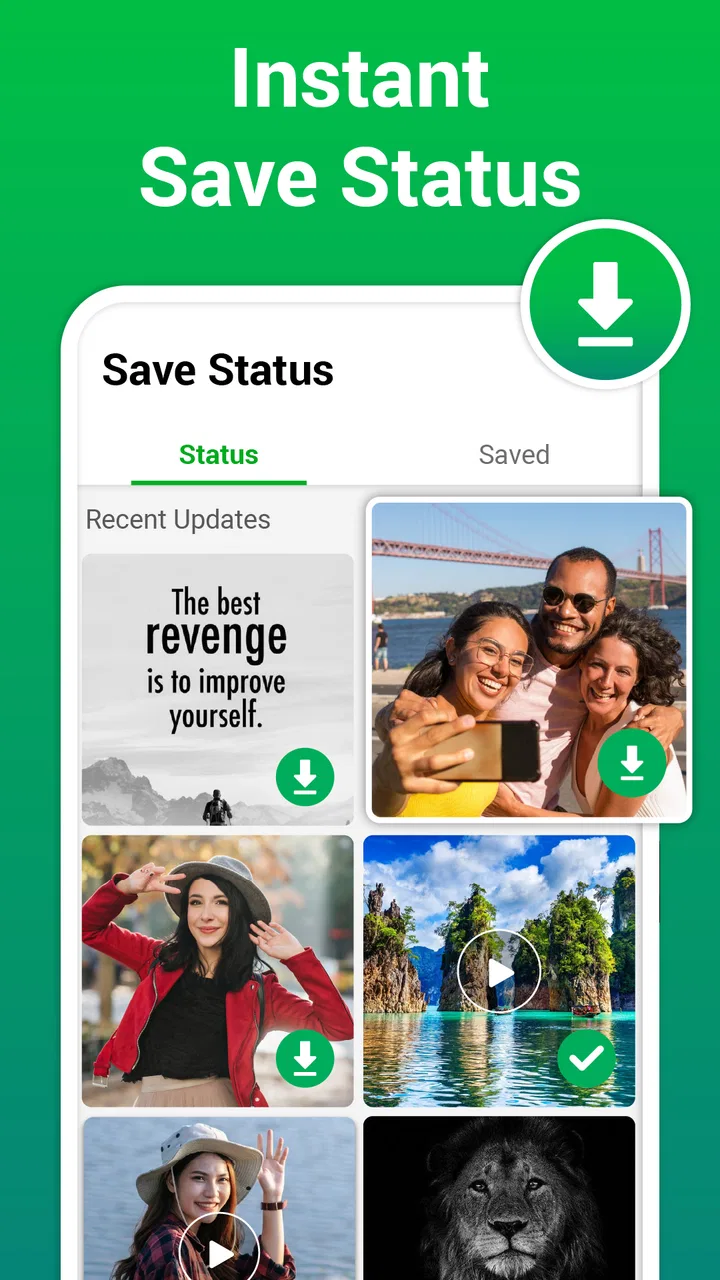
I spent time with Status Saver: Video Downloader as a practical social app rather than treating it as just another download utility. Its purpose is straightforward: help me find status updates, save the ones I am allowed to keep, and share them again when that makes sense. That narrow focus is also its main appeal. I do not have to sort through a large toolbox of unrelated social features before reaching the action I want.
The app comes from BlueLine. Tech and is available free of charge for Everyone. It sits in the social category, although its day-to-day role is closer to a media-handling companion for status content. The current release is version 4.6.1, and the app runs on Android 6.0 or later. With an average rating of 4.8 from around 198 thousand ratings and more than 50 million installs, it is clearly familiar to a large Android audience.
How the app feels when I use it
I find that the app’s appeal is easiest to judge through the small routine it creates: opening it with a particular status in mind, deciding whether it is worth keeping, and then closing it. That makes the first few uses feel uncomplicated, but lasting usefulness depends on what happens after the initial curiosity. I’ll look at how often that routine earns a place in my day and what can make it feel like extra upkeep.
You May Also Like

 Blood Strike: 2.5 Anniversary
Blood Strike’s Loadouts Turn Every Drop Into a Tactical Gamble
A close look at Blood Strike’s custom loadouts: how fast access to signature weapons reshapes its battle royale rhythm, rewards preparation, and narrows the gap between fights.

 Pandora - Music & Podcasts
Pandora’s Music Is Easy to Start, but Harder to Recover
Pandora’s strength is its low-effort path from a seed to a station. Its weak spot is how much confidence it asks you to place in connection, setup, and quiet recovery.

 8 Ball Pool
 Is Built on Rivalries, Rematches, and Routine
A close look at the rivalries, rematches, shared routines, and unanswered safety questions that turn a quick pool match into a persistent mobile community.

 Samsung Music
’s Quiet Strength Is Playing What You Already Own
Its reach comes less from spectacle than from dependable access to a personal library. That simplicity is both the app’s strongest retention engine and its ceiling.

 AccuWeather: Weather Radar
AccuWeather Review: A Quick, Clear Forecast for Everyday Decisions
For everyday plans, the best forecast is the one you can understand quickly. AccuWeather makes rain timing, radar, and local conditions easy to act on, with a few trade-offs.

 Hill Climb Racing
Why Hill Climb Racing Still Turns Crashes Into One More Run
A tiny car, a bumpy hill and one more upgrade: Hill Climb Racing keeps resurfacing because its simple chaos makes every near-miss feel personal.
More From Our News Desk
View All News


Readability and navigation come first
The best part of this app is that its job is easy to understand. I open it with a specific intention, look through available status items, and choose whether to save or share. That direct path matters more than a long feature list, especially when I am checking several updates quickly.
I found the central workflow easier to follow than the usual alternative of opening a status in the original social app, searching for a separate download method, and then moving the file into a useful place. Keeping the discovery and saving steps together reduces the amount of switching I need to do. For someone who is not comfortable moving between apps, that can make the difference between a task feeling simple and feeling unnecessarily technical.
There is also a useful distinction between viewing something and deciding what to do with it. I can pause before saving instead of automatically filling my phone with every update. That small moment of choice is valuable because status feeds often contain temporary jokes, announcements, photos, and videos that are not all worth keeping.
For readability, I prefer using the app when I already know what I am looking for. A busy status feed can still require attention, and a media saver cannot remove the visual differences between a clear image, a dark clip, a text-heavy post, and a fast-moving video. People who rely on strong visual separation may need to slow down and inspect each item rather than tapping through quickly.
The interface is most comfortable when I use it in short sessions. I would not describe it as a full media library, and that is important. It helps with the immediate save-and-share action, but I still need my phone’s gallery or file tools for longer-term organization. If I keep many saved items, I should create a routine for sorting them instead of expecting the app itself to become my permanent archive.
Helpful for different ways of interacting
From an inclusive-use perspective, the app’s simple purpose is a strength. Someone with limited experience using Android can understand the basic idea without learning a complicated editing system. The fewer decisions presented at once, the easier it is to concentrate on the status item itself.
That simplicity can also help people who experience cognitive fatigue. I can open the app for one task, complete it, and leave. There is less pressure to remember a multi-step production process, compare editing tools, or configure a large collection of options. For occasional users, a short repeatable routine is more useful than a powerful interface that demands constant learning.
Motor control is a more mixed experience. Saving or sharing still depends on accurate taps, and media thumbnails can be close enough that I would not rush through them when using the phone one-handed. I recommend holding the device securely, enlarging the system display if needed, and confirming the selected item before committing to an action. Those are ordinary phone adjustments, but they make this kind of thumbnail-driven workflow less error-prone.
For users who find repeated tapping tiring, the app is most practical when used selectively. Instead of processing every status, I would save only the items that have a clear purpose. That reduces hand movement and also prevents the gallery from becoming cluttered. A focused workflow is one of the quiet advantages of a tool with such a narrow job.
People with sensory sensitivities may appreciate that the app is not trying to be a constantly updating social network. I can use it as a utility and close it. However, the media itself may contain flashing visuals, loud audio, or rapid movement, depending on what someone has posted. The app cannot make every status comfortable to watch, so I would review content carefully and use the phone’s own volume and display controls when necessary.
Where it fits into everyday situations
A realistic example is a family group where a relative posts a short celebration video as a status. I may want to keep it for a personal memory or share it with another family member who missed it. With a normal social app, I might take a screenshot for an image or ask the person to send the original file. This utility gives me a more direct route for status media, which is especially convenient when the sender is not nearby or is not comfortable with file-sharing steps.
Another situation is a community announcement that appears briefly during a busy day. I can save it to check later instead of relying on memory. This can help someone who needs more time to read or process information, although I would still verify important details with the original poster because a saved copy may become outdated.
The app can also suit people who communicate visually. If a friend posts an image that is easier to understand than a written explanation, saving it may make later reference simpler. The benefit is not only convenience; it can reduce the need to repeatedly navigate a fast-moving status feed.
On the other hand, I would not choose it as my first tool for formal content management. If I need captions, trimming, conversion, folders, backup, or detailed editing, a dedicated gallery or media editor is likely better. Status Saver: Video Downloader is useful at the point of capture, not as a replacement for every tool that comes afterward.
It is also worth thinking about consent. A status may be visible to me without being intended for redistribution. I treat the save and share buttons as technical options, not automatic permission. Before forwarding someone’s personal photo, private message, or family video, I would ask the person who posted it. That habit is more important than speed.
Practical trade-offs compared with usual alternatives
The most common alternative is to ask the original poster to send the media directly. That approach is better when I need the original quality, want clear permission, or expect to use the file repeatedly. It can be slower, though, and it places another task on the person who created the status.
Another alternative is taking screenshots or recording the screen. Those methods may work in a hurry, but they can produce lower-quality results and often capture interface elements that I do not want. For video, screen recording also adds a separate cleanup step. A focused status-saving app is more convenient when the goal is simply to keep the media rather than recreate it manually.
Using the original social app alone is preferable when I only want to view, react, or reply. Installing a separate utility adds another app to my phone, so it makes sense only if saving and sharing status content is a recurring need. For occasional use, asking the sender may be the cleaner choice.
The trade-off is that convenience can encourage careless collecting. I have to make decisions about storage, privacy, and organization. My practical tip is to save with a purpose, review the gallery afterward, and remove duplicates or items that no longer matter. This turns the app from an indiscriminate collector into a small part of a deliberate workflow.
Small workflow improvements that make a difference
My first useful habit is to preview before saving whenever possible. A thumbnail can hide a blurred frame, an unwanted duplicate, or a clip that is much longer than expected. Checking first saves storage and reduces accidental downloads, particularly for users who manage limited space or prefer a quieter gallery.
My second habit is separating temporary saves from important memories. I save a status when I know why I want it, then move genuinely valuable items into the phone’s normal photo organization. This prevents the app’s role from becoming confused with backup. If a file matters, I do not rely on a single location.
My third tip is to use sharing selectively rather than treating it as the natural next step after saving. Saving gives me time to inspect the content, consider the audience, and decide whether forwarding is respectful. This is especially helpful for users who need extra time to read small text or understand a video before passing it along.
A fourth consideration is device context. On a small screen, I would avoid rapid one-handed selection and use a stable grip. In a bright environment, I would increase screen brightness only as much as needed, since glare can make thumbnails harder to distinguish. In a noisy place, I would rely on the visual content first and postpone clips that require careful listening.
Barriers I would want users to consider
The app’s focused design does not remove every obstacle. People with low vision may find media thumbnails difficult to distinguish, especially when several posts look similar. System-level magnification, larger display settings, or a larger screen can help, but the experience still depends on the clarity of the original status.
Users with limited dexterity may find confirmation taps and small controls demanding during fast browsing. I would avoid using it while walking or carrying something, because a rushed tap can select the wrong media. A deliberate pause is more reliable than trying to process a feed at maximum speed.
People who depend on audio description, captions, or other detailed media accessibility support should judge each saved item separately. The app handles the saving and sharing workflow; it does not turn every status into an accessible version. A video that was difficult to understand in the original feed may remain difficult after saving.
There is also a privacy and storage trade-off. Saved media becomes part of the device’s local collection, so I would think about who else can access the phone and whether sensitive files should remain there. The free price makes trying the app easy, but in-app purchases can reach $29.99 for an individual item, so I would pay attention before approving any optional purchase.
The Everyone age rating makes the app broadly approachable, but that does not mean every status is suitable for every viewer. User-generated media can vary widely in tone and subject. I would still use ordinary judgment when saving or sharing content, particularly on a shared device or around children.
Who should use it, and who should skip it
I would recommend it to someone who regularly receives useful, funny, or meaningful status media and wants a quicker way to keep it. It is also a reasonable choice for users who find repeated switching between a social app, screenshots, screen recording, and the gallery frustrating. Its value grows when the same save-and-share task appears several times during the week.
I would be more cautious recommending it to someone who rarely saves status updates. In that case, the original app or a direct request to the sender may be enough. I would also point creative users toward a proper media editor if their main goal is trimming, adding captions, improving sound, or preparing polished posts.
For people who need advanced accessibility features built specifically into a media workflow, I would test the app personally before depending on it. Its focused path may be easier than a larger social platform, but ease of purpose is not the same as comprehensive support for every visual, motor, hearing, or cognitive need.
My inclusive verdict after using it
Status Saver: Video Downloader works because it concentrates on a common Android task and keeps the basic idea understandable. I like it most as a selective capture tool: find a status, inspect it, save what has a reason to be saved, and share only when appropriate. The approach is less cumbersome than screenshots or screen recording, while remaining simpler than a full media-management suite.
Its limitations are equally clear. It is not a complete archive, editor, backup system, or accessibility solution. Thumbnail selection can still challenge users with motor or visual limitations, and the accessibility of the final media depends heavily on what the original poster created. I also think responsible sharing matters more here than the app’s speed.
BlueLine. Tech has made a useful social companion for people who want a direct status-saving routine. The free entry point, broad age rating, current Android compatibility, and substantial user adoption make it easy to consider. My recommendation is positive for regular status savers, but conditional for everyone else: try it when this exact task is part of your routine, keep the workflow deliberate, and use a dedicated gallery or editor when your needs go beyond saving and sharing.
FAQs for Status Saver: Video Downloader
01What is Status Saver: Video Downloader, and how does it work?
Status Saver: Video Downloader is an app designed to help users download and save videos and photos from social media status updates. It works by allowing users to view statuses directly within the app, and with a simple tap, they can download and save those statuses to their device for offline viewing. This app supports multiple social media platforms, making it a versatile tool for anyone who enjoys sharing and saving content.
02Is Status Saver: Video Downloader safe to use?
Yes, Status Saver: Video Downloader is generally safe to use as long as it is downloaded from a reputable source such as the Google Play Store or Apple App Store. The app respects user privacy and does not store or misuse any personal data. However, users should always review permissions and ensure they are comfortable with the data the app can access.
03Does Status Saver: Video Downloader require an internet connection?
Yes, an internet connection is required to view and download statuses from social media platforms. Once downloaded, however, the content can be accessed and viewed offline at any time. Users should be aware of their data usage, especially when downloading large video files, to avoid exceeding mobile data limits.
04Are there any in-app purchases or ads in Status Saver: Video Downloader?
Status Saver: Video Downloader typically offers a free version that may include ads to support its development. Some features may be unlocked through in-app purchases, such as an ad-free experience or additional downloading options. Users can choose to upgrade if they find the app useful and want to enhance their experience.
05Can I share the downloaded content directly from the app?
Yes, Status Saver: Video Downloader allows users to share downloaded content directly from the app. Once a status is saved, users can easily access it in their gallery and share it via various platforms, such as messaging apps or social media. This feature makes it convenient for users to share interesting content with friends and family.
Pros
- Easy to use with a clean interface.
- Supports multiple video formats.
- Fast download speeds.
- No login required to access features.
- Includes built-in media player.
Cons
- Contains frequent ads that can be intrusive.
- Limited editing features for saved media.
- Requires manual updates for new statuses.
- No cloud backup for downloaded files.
- Lacks advanced privacy settings.

Status Saver: Video Downloader
Gallery